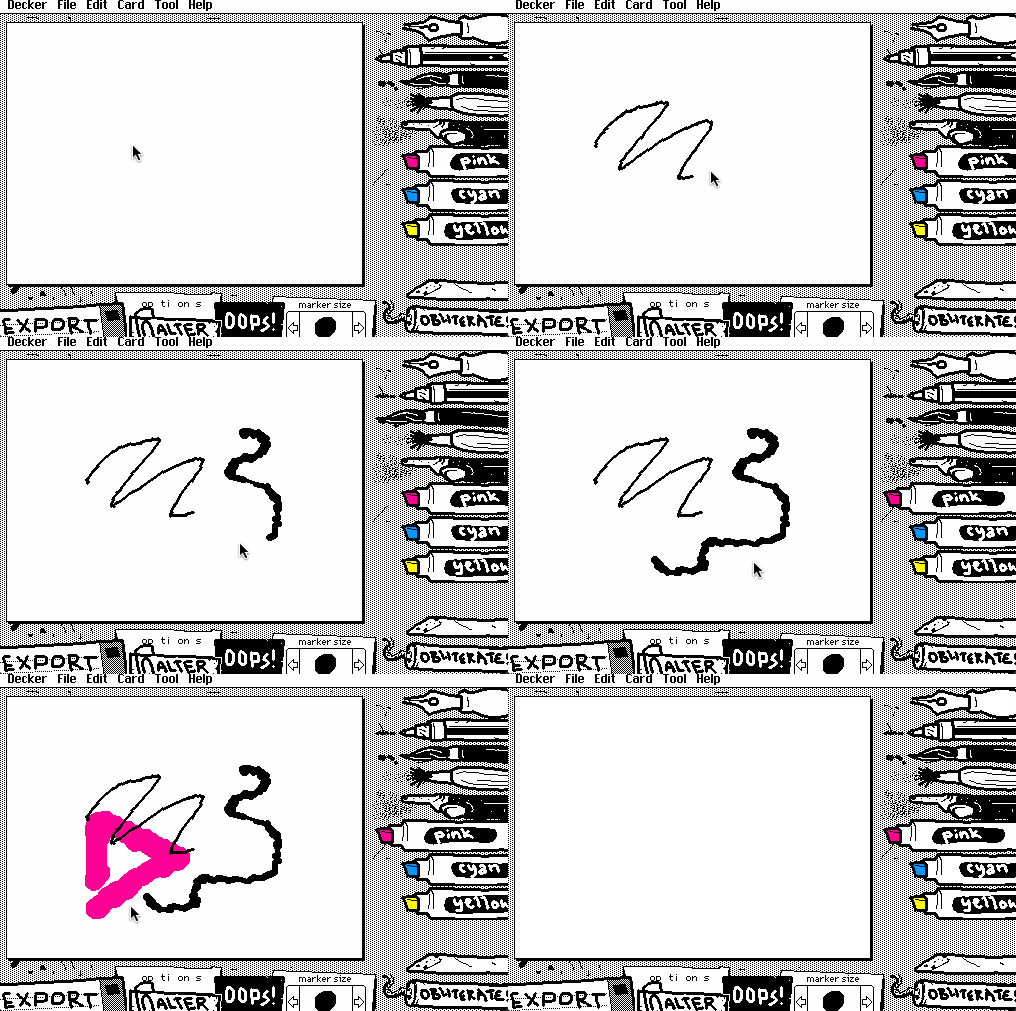
In early December 2023, I wrote a drawing program called WigglyPaint and published it on Itch.io.
All the drawing tools in WigglyPaint are animated, providing a live, automatic Line Boil effect:
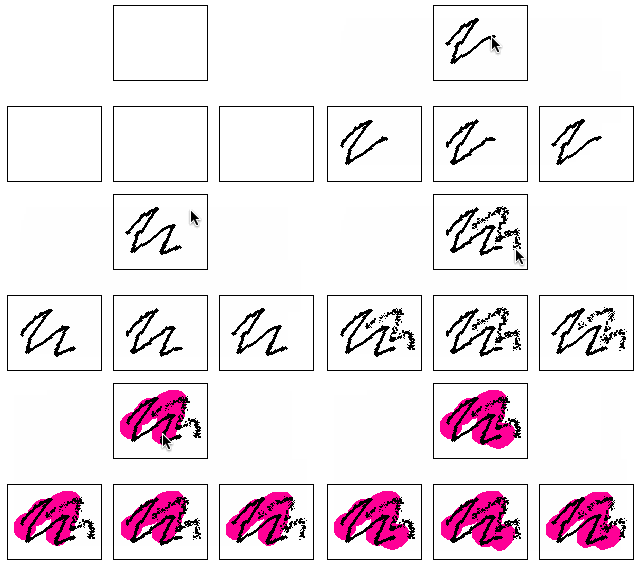
Internally, WigglyPaint maintains three image buffers and edits them simultaneously, with different types of randomization applied for different drawing tools; many tools apply a random position offset between stroke segments or randomly select different brush shapes and sizes:
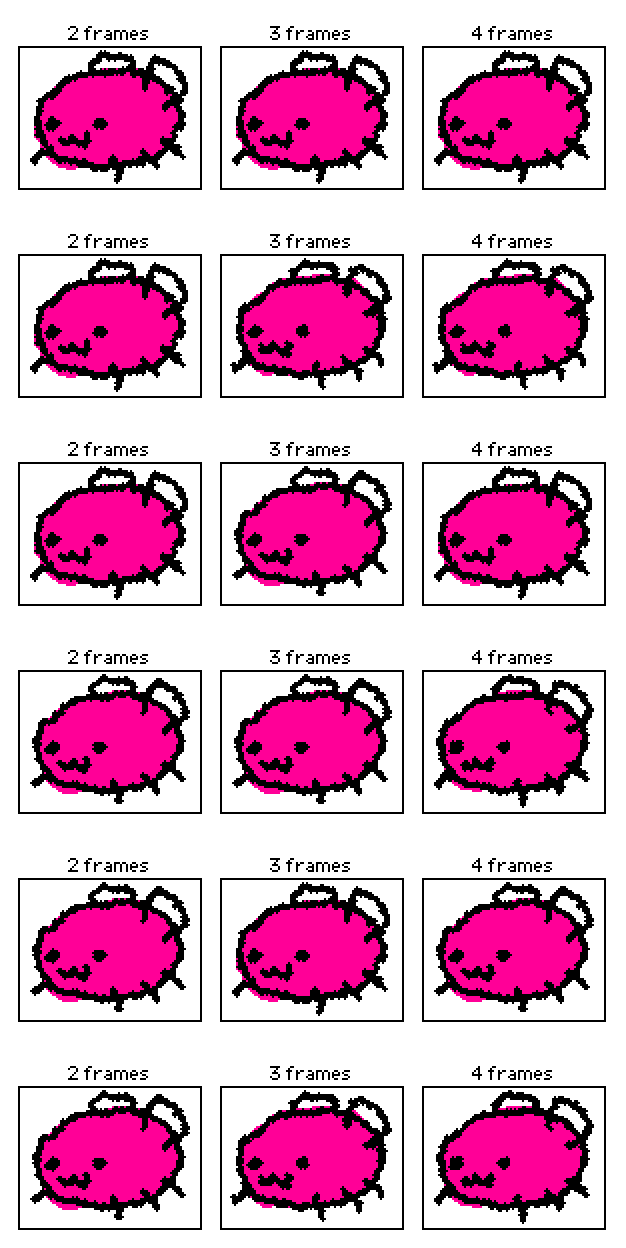
We cycle through displaying the buffers at roughly 12 frames per second- a familiar speed for limited animation- though the drawing itself is processed more responsively. Three frames is something of a sweet spot: using only two frames produces an unpleasant jittering effect, and more than three frames offer a diminishing addition of fluidity:
WigglyPaint is far from the first example of a drawing program that automatically introduces line boil; as I note in my Readme, it has some similarity to Shake Art Deluxe from 2022. The details of these tools are very different, though; Shake Art is vector-oriented, and continuously offsets control points for line-segments on screen. Individual lines can have different oscillation intensities and rates, with continuously variable settings for every parameter and a full hue-saturation-value gamut for color.
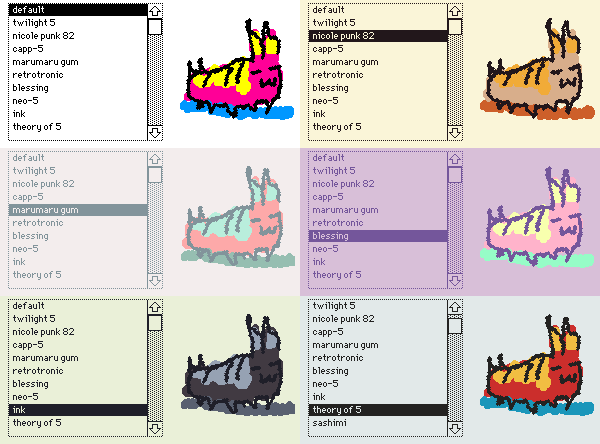
In WigglyPaint, I chose a design philosophy of strongly discretizing choices: good defaults, a few interesting options, no infinite combinatoric landscapes. Every drawing tool has a distinct personality. Instead of offering the millions of subtly varied colors available in a general-purpose drawing program, WigglyPaint offers five colors at a time- lineart, background, and three “markers”- with a range of striking, opinionated preset palettes:
Instead of an infinite undo history, WigglyPaint has a single “Oops” button. From a technical perspective, more undo levels would be easy to furnish. No undo levels at all can be truly infuriating, especially on touch-based devices that occasionally register spurious lines. A single undo level is just enough: it encourages a sense of committing to forward momentum on a drawing.
One particularly clever- if simple- idea I incorporated is to make the “markers” always draw underneath lineart:
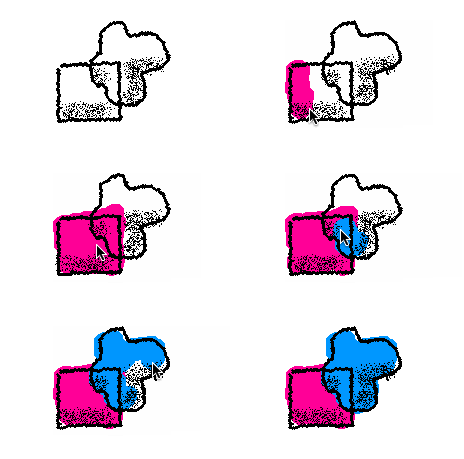
This offers the kind of drawing workflow that an artist might normally accomplish through layered drawing tools like Photoshop without the complexity of a UI for creating, reordering, flattening, grouping, or destroying layers, nor the mental overhead of switching between layers over the course of a project.
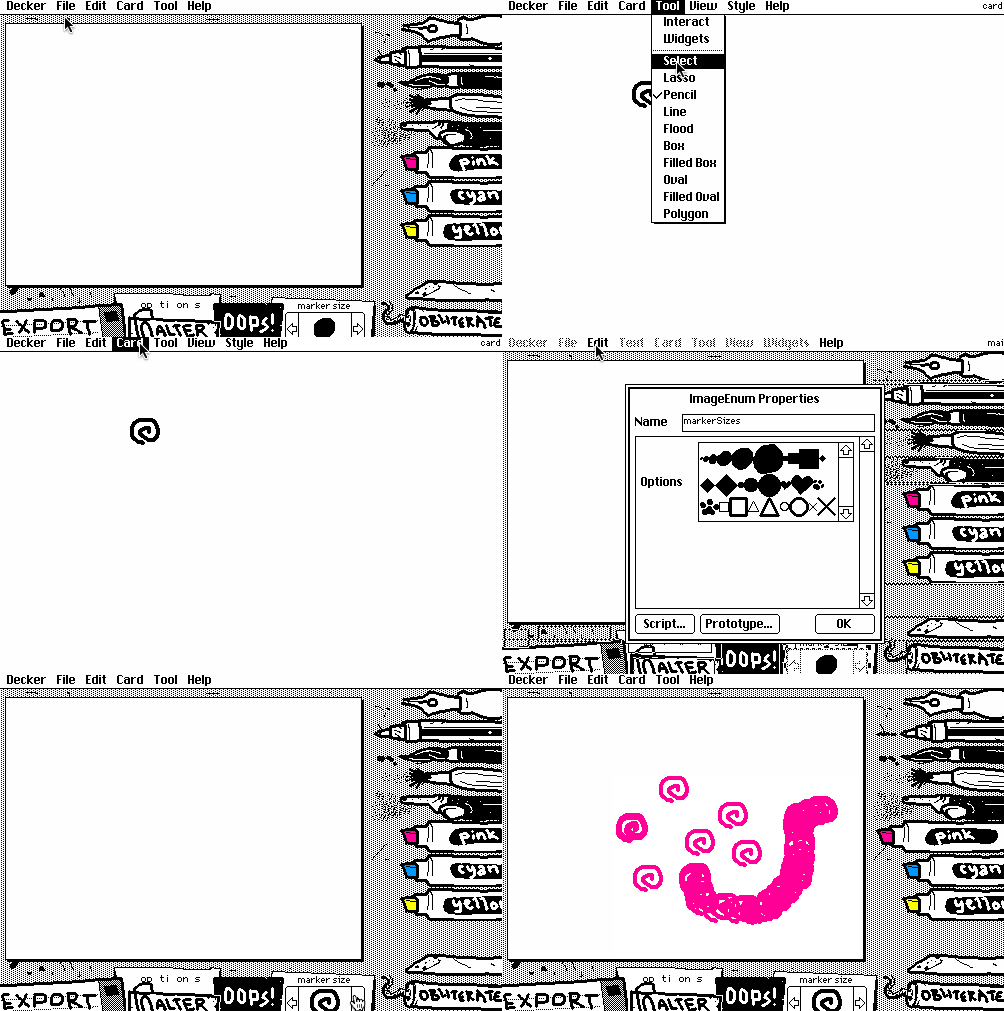
By virtue of being built in Decker, WigglyPaint has another set of tricks up its sleeve that none of its peers can match: if something you want isn’t there, it’s trivial to reach in and add it live. Here I use Decker’s editing tools to create a new brush shape from scratch in a few seconds:
I think WigglyPaint’s good defaults and discrete choices are a big part of the appeal of the tool. Many users have commented that it’s great at helping them break out of artist’s block and relearn how to work fast and loose. Your drawings will never be perfect, so you can just embrace imperfection and make it a strength.
WigglyPaint’s initial release was quietly positive, especially within the Decker user community and on the now-defunct Eggbug-Oriented social media site Cohost. It was very rewarding to see the occasional user avatar with WigglyPaint’s unmistakable affectation, and the slow, steady trickle of wiggly artwork left in the Itch.io comment thread for the tool. As an experiment, I cross-published the tool on NewGrounds; it’s a much tougher crowd there than on Itch.io, but a few people seemed to enjoy it. If that’s where WigglyPaint’s story had tapered off into obscurity, I would’ve been perfectly satisfied.
After more than a year of quietly languishing, I glanced at my Itch.io analytics page one day and noticed a massive spike in traffic to WigglyPaint. As I would slowly piece together, WigglyPaint had become an overnight phenomenon among artists on Asian social media. The mostly-wordless approachability of the tool- combined with a strong, recognizable aesthetic- hit just the right notes. I went from a userbase of perhaps a few hundred mostly-North-American wigglypainters to millions internationally.
There is, perhaps, a version of this story where I rode the success of my scrappy little tool to personal fame and financial stability, but I simply don’t have the heart for it. I often feel that the people who most stand to benefit from the creative tools I build are the ones who wouldn’t be able to afford them if I charged money. WigglyPaint is and always will be free on top of its radically open-source, malleable nature.
I see most of the programs I build with Decker as a sort of software ambassadors for the future I’d like to see. I offer them as gifts.
If you search your favorite (or least-despised) social media or video sharing site, you can probably find quite a few
#wigglypaint posts; countless users are enjoying WigglyPaint and actively posting their drawings, sometimes streaming themselves or even drawing wiggly commission pieces for one another. It’s wonderful to see this human creativity on display, and I’m truly happy for those users.
There’s one little problem, though. If you know what to look for, almost all of those videos, streams, and screenshots are visibly of WigglyPaint v1.3, which at time of writing was released well over a year ago. Last month I released v1.5. If so many people are enjoying WigglyPaint, why are so many of them using such an old version?
If you use a general search engine to simply look for WigglyPaint, you’ll see your answer. Right at the top of the results are wigglypaint.com, wigglypaint.art, wigglypaint.org, wigglypaint.net, wiggly-paint.com, and half a dozen more variations. Most offer WigglyPaint, front-and-center, usually an unmodified copy of v1.3, sometimes with some minor “premium features” glued onto the side or my bylines peeled off. If you dig around on these sites, you can read about all sorts of fantastic WigglyPaint features, some of which even actually do exist. Some sites claim to be made by “fans of WigglyPaint”, and some even claim to be made by me, with love. Many have a donation box to shake, asking users to kindly donate to help “the creators”. Perhaps if you sign up for a subscription you can unlock premium features like a different color-picker or a dedicated wiggly-art posting zone?
I want to be absolutely clear here: NONE of these sites are created by me, or with anything remotely resembling my permission.
The sites are slop; slapdash imitations pieced together with the help of so-called “Large Language Models” (LLMs). The closer you look at them, the stranger they appear, full of vague, repetitive claims, outright false information, and plenty of unattributed (stolen) art. This is what LLMs are best at: quickly fabricating plausible simulacra of real objects to mislead the unwary. It is no surprise that the same people who have total contempt for authorship find LLMs useful; every LLM and generative model today is constructed by consuming almost unimaginably massive quantities of human creative work- writing, drawings, code, music- and then regurgitating them piecemeal without attribution, just different enough to hide where it came from (usually). LLMs are sharp tools in the hands of plagiarists, con-men, spammers, and everyone who believes that creative expression is worthless. People who extract from the world instead of contributing to it.
It is humiliating and infuriating to see my work stolen by slop enthusiasts, and worse, used to mislead artists into paying scammers for something that ought to be free.
It’s not just websites where you can find stolen copies of WigglyPaint for sale, either. Plenty of clowns have crudely shoved my tool into a WebView wrapper and started trying to sell “The App Version of WigglyPaint” for iOS or Android, carefully phrasing their app store summaries with just enough ambiguity to imply- without technically saying so- that gullible users who give them a few dollars are helping support me. The subtler, deeper insult is the way these “ports” seal off Decker’s editing tools, preventing paid users from being able to reshape or customize WigglyPaint and make it their own. As usual, mobile users get a locked-down, mutilated appliance for their money instead of empowerment.
No one facet of WigglyPaint is particularly complex; a few paragraphs into this article you already knew everything essential about achieving its signature flavor of line-boil. Discounting the invisibly discarded prototypes and false-alleys I went down over the course of its development, WigglyPaint’s scripts are only a few hundred lines of code. I hope I’ve managed to convey here that the design, while simple, is very intentional in non-obvious ways, and that the whole of the application is rather more than the sum of its parts.
It would be fine if people were building their own riffs on WigglyPaint’s ideas; they’re just ideas. It would be easy to create something new from these ideas, but the thieves can’t be bothered to add even the tiniest creative spark of their own.
The only reward I ever wanted for projects like WigglyPaint is a chance to grow my audience, and share my projects with more people. Since so much of my hypothetical userbase is unwittingly using stolen copies of WigglyPaint, and sharing links to the same slop sites they were linked to- and so on, and so forth- they’ll never know about any of my other projects. They won’t see updates I publish, or documentation I revise. I have been erased.
The most wildly successful project I’ve ever released is no longer mine. In all my years of building things and sharing them online, I have never felt so violated.
That’s all.